Dice roller
Features · Dice roller
The dice roller lives in the app header, between the connection badge and the campaign menu. Tap the d20 icon to open it.
Every roll is broadcast over Socket.IO to every connected player — so when the GM rolls a fortune die or a player calls a skill test, the whole table sees the same dice and the same total.
Quick rolls
A grid of one-tap buttons covers the common dice: d4, d6, d8, d10, d12, d20, 2d6, d100. Each tap rolls once and prepends a new entry to the log.
Custom expressions
The text field below the quick grid takes standard dice notation:
d20— one d202d6+3— two d6 plus a flat 3d20-1— one d20 with a -1 penalty3d4+2d6+1— mixed groups join togetherD20 + 2— whitespace and case are tolerated
Bad input (hello, 0d6, …) surfaces a toast instead of a roll.
Macros
Repeated rolls — Longsword attack, Sneak, Healing touch — don’t need to be retyped. Type an expression in the custom-roll field, give it a name below, and tap Save: the macro shows up as a one-tap pill in the Macros strip and rolls the saved expression on a single click.
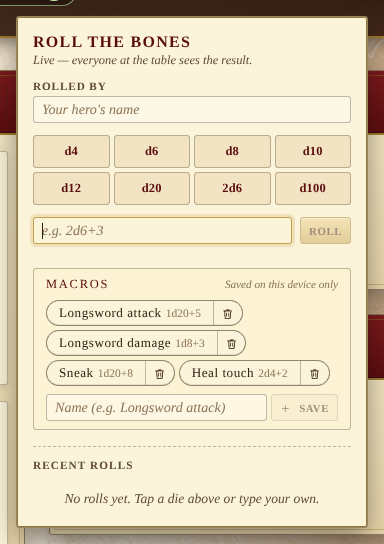
Macros are stored under the per-device preference namespace in
localStorage. They survive reloads but are device-local — they
are not part of the shared campaign state and are not included in the
campaign backup file. Re-saving an existing name overwrites the
expression rather than piling up duplicates, and the strip caps at
twelve to keep the popover tight. The trash icon on each pill removes
it.
Rolled by
The Rolled by field carries the player’s name into every roll they make and is remembered across reloads. Leave it empty and your own rolls show as “You”; everyone else’s nameless rolls show as “Stranger”.
The log
The most recent twenty rolls are kept on every device. Each entry shows the roller, the expression, the individual dice, any modifier, and the total. On a d20 a natural 1 or a natural 20 is highlighted so a crit or a botch is hard to miss.
Hovering an entry reveals a Re-roll shortcut that repeats the same expression — useful when a skill test calls for “roll again, take the worst”. Clear wipes the local log; it does not affect anyone else’s.
Realtime experience
When a peer rolls while your popover is closed, the dice icon shakes briefly and a toast announces who rolled what. Open the popover to see the detail.